Showing posts with label hardware. Show all posts

Saturday, March 12, 2011

My lame IR copy toy.

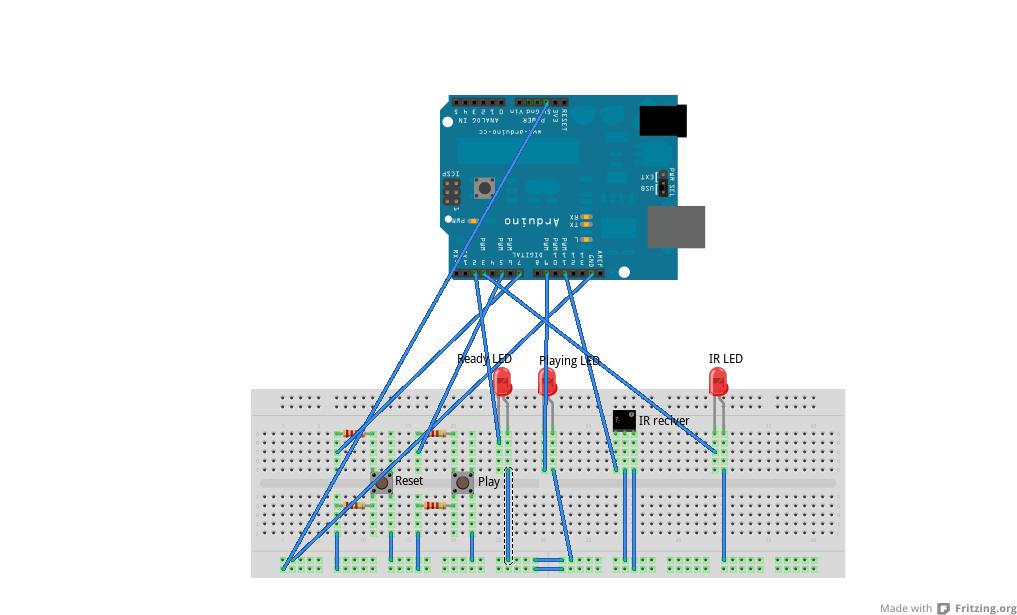
I got a sweet arduino for my bday and it kind of just sat around till i got a few things together to start work on my first project. Well i finally got off my ass, got all the shit i needed and got to work! I am about half way done and i thought i would share my progress so far. heres a little video of my toy in action and i go over the operation and components.


Here is a better view of how its put together:

And here is my uber 1337 code :P

#include < IRremote.h >

int IRRECV = 11;
int READYLED = 9;
int PLAYBUTTON = 5;
int IRLED = 3;
int RESETBUTTON = 7;
int PLAYLED = 2;
decode_results results;
IRrecv irrecv(IRRECV);
IRsend irsend;

void setup()
{
Serial.begin(9600);
irrecv.enableIRIn();
pinMode(READYLED, OUTPUT);
pinMode(PLAYBUTTON, INPUT);
pinMode(RESETBUTTON, INPUT);
pinMode(PLAYLED, OUTPUT);
}
int codeType = -1;
unsigned int rawCodes[RAWBUF];
int codeLen;
void rec(decode_results *results)
{
int count = results->rawlen;
codeLen = results->rawlen - 1;
for (int i = 1; i <= codeLen; i++) {
if (i % 2) {
rawCodes[i - 1] = results->rawbuf[i]*USECPERTICK - MARK_EXCESS;
Serial.print(" m");
}
else {
rawCodes[i - 1] = results->rawbuf[i]*USECPERTICK + MARK_EXCESS;
Serial.print(" s");
}
Serial.print(rawCodes[i - 1], DEC);
}
Serial.println("");
digitalWrite(READYLED, HIGH);
}

void play()
{
digitalWrite(PLAYLED, HIGH);
Serial.println(rawCodes[0]);
irsend.sendRaw(rawCodes, codeLen, 38);
delay(800);
digitalWrite(PLAYLED, LOW);
}

void reset()
{
int codeType = -1;
unsigned int rawCodes[RAWBUF];
int codeLen;
digitalWrite(READYLED, LOW);
setup();
}

void loop()
{
if (irrecv.decode(&results) && digitalRead(READYLED) == LOW) {
rec(&results);
irrecv.resume();
}
if (digitalRead(PLAYBUTTON) == LOW && digitalRead(READYLED) == HIGH)
{
play();
}
if (digitalRead(RESETBUTTON) == LOW)
{
reset();
}
}


Ok thats all i got, peace.

Sunday, January 9, 2011

Poor mans IR filters for phones

At the last dc414 meeting i gave out IR filters for camera phones that i made my self. Most cameras on phones are made really cheaply and do not filter out IR, thats why camp fires and such come out looking a little purple, or pink when us take a pic using a camera phone. This happens because the sensor interprets IR to the human visual spectrum as white. To make the filters i went to walgreens, got some 35mm film, opened it up and exposed the entire role to bright light, rolled it back up into its container and asked the kind ppl at the one hour photo counter to develop my role. I also informed them that i didnt want any prints, just the negatives. Then of course i had to explain to them what it was i wanted. You can see how this might seem to be a odd request so be expecting to take a little extra time if you choose to go this route, it will take some explaining.

So why IR filters? Well taking pics with these little guys makes stuff like envelopes transparent, as well as some plastics and CLOTHES!! Making this every nerds dream! lol.

Heres a pic of the IR filters "film":


Heres a pic a took of my stove top:

Saturday, January 1, 2011

Re-DROID with stock 2.2.1

Over the holidays i dropped my phone "A Motorola DROID" in some salt filled slush in the parking lot of walmart :( It still worked kind of, buttons seemed to go crazy however. Hitting just one button did multiable things. So i took it to my local verizon store, they informed me that i would be getting a new phone in the mail in the next week or so :( Luckily for me i only had to wait four days or so, but they sent me the wrong fucking phone. Again i go back to Verizon to bitch but this time they have my phone in stock...ok. Sweet i got my new old phone.

My new old phone is nice but i found that it came with Android 2.2.1 and not 2.1 like it did before. I gave the old update.zip root i had from my old phone a try but it didn't do shit. So i took to the net to find a new setup. After a few failed attampts i found this thread about a app called SuperOneClick. I had to use cmoney's XP desktop and install .NET 3.5 form M$. That was all i need to get the SuperOneClick software to run on the desktop. To get the pc to phone data connection going at the level that the app needed i had install the Motorola Phone USB drivers. Now all i had to do was make sure USB debugging was enabled on my phone. Plug in the USB cable from the PC to my phone, hit the root button and wait for it to do its thing! Thanx to everyone involved in the SuperOneClick software, you did a awesome job!! I am now enjoying my new old rooted DROID :D There is still more work to be done on this but that will be later.

Monday, August 16, 2010

Toys for hackers

The other day i friend of mine introduced me to Arduino, and i been playing with it ever since xD There is something about coding hardware that is very gratifying. So anyway i got my first toy done and i thought i would share it with you. Heres my leet video of my creation in action:


Here is the source code for my little toy:


int sensorPin = 0;
int ledPin = 13;
int sensorValue = 0;
const int buttonPin = 2;
const int buttonPin2 = 1;
int buttonState = 0;
int buttonState2 = 0;

void setup() {
pinMode(buttonPin, INPUT);
pinMode(ledPin, OUTPUT);
}

void loop() {
buttonState = digitalRead(buttonPin);
buttonState2 = digitalRead(buttonPin2);
if(buttonState2 == LOW)
{
digitalWrite(ledPin, HIGH);
return;
}
if(buttonState == LOW)
{
digitalWrite(ledPin, LOW);
}else{
digitalWrite(ledPin, HIGH);
sensorValue = analogRead(sensorPin);
delay(100);
digitalWrite(ledPin, LOW);
delay(sensorValue);
}
}


Isnt it sexy? :P I am looking forward to a long and loving relationship with this and you can expect more to come xD